LeOsler Rough Icon Pack: A Creative Resource for Designers
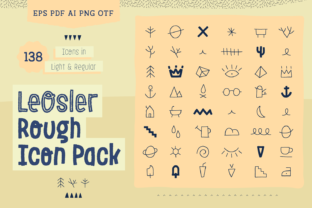
In the ever-evolving world of design, having access to high-quality, versatile icons can make a significant difference in the final outcome of your projects. The LeOsler Rough Icon Pack is one such resource that offers designers a unique collection of 138 hand-drawn vector icons. These icons are not just visually appealing—they are also highly customizable and adaptable, making them ideal for a wide range of creative applications.
What Is the LeOsler Rough Icon Pack?
The LeOsler Rough Icon Pack is a curated set of icons designed with creativity and usability in mind. Each icon is crafted with a distinct rough texture, giving them a tactile and organic feel. This pack is perfect for those who want to add character and personality to their designs without sacrificing quality or versatility.
Whether you're working on a stationery project, designing a book cover, creating packaging materials, or developing printables like wrapping paper or invitations, this icon pack provides the tools you need to elevate your work. The icons are available in multiple formats, ensuring compatibility with various design software and workflows.
Key Features of the LeOsler Rough Icon Pack
- 138 Vector Icons: The pack includes a comprehensive collection of icons that can be easily scaled and edited to fit any design requirement.
- High-Quality Illustrations: Each icon is hand-drawn and carefully crafted to maintain clarity and detail even when resized.
- Multiple File Formats: The icons are provided in AI CS6, EPS, PDF, PNG, and OTF formats, offering flexibility for both digital and print use.
- Customizable: You can adjust the color, scale, and style of each icon to match your project's aesthetic.
- Two Weights Available: The pack includes two weights—Light and Regular—both featuring a rough texture for a consistent look.
Why Choose the LeOsler Rough Icon Pack?
Designers often face the challenge of finding icons that are both visually appealing and functional. The LeOsler Rough Icon Pack addresses this by offering a unique blend of artistry and practicality. Here’s why it stands out from other icon packs:
Hand-Drawn Quality
Unlike many generic icon sets, the icons in this pack are hand-drawn, which gives them a distinctive, artisanal quality. This attention to detail ensures that each icon feels personal and authentic, adding a human touch to your designs.
Easy Customization
One of the greatest advantages of using vector icons is their scalability and editability. With the LeOsler Rough Icon Pack, you can easily adjust the color, size, and style of each icon to suit your project. Whether you're creating a logo, a poster, or a set of labels, the ability to customize these icons makes them incredibly versatile.
Wide Range of Applications
This icon pack is suitable for a variety of creative projects, including:
- Stationery and greeting cards
- Book covers and booklets
- Wrapping paper and gift tags
- Product packaging and branding
- Printable posters and invitations
- Labels and stickers
- Interior design elements
These icons can be used in both digital and print formats, making them a valuable asset for designers working across different mediums.
How to Use the LeOsler Rough Icon Pack
Using the LeOsler Rough Icon Pack is straightforward, thanks to its user-friendly file formats and intuitive structure. Here’s a quick guide to help you get started:
Step 1: Download and Install
Begin by downloading the icon pack from the official source. Once downloaded, you can install the OTF font file to use the icons directly in your design software. This allows you to search for icons using the Glyphs Panel, making it easy to find and apply the right icon for your project.
Step 2: Open Your Design Software
Open your preferred design tool, such as Adobe Illustrator or InDesign. If you've installed the OTF font, you can access the icons through the Glyphs Panel. If you're using the AI CS6 files, simply open them and select the icons you need.
Step 3: Customize and Apply
Once you've selected an icon, you can customize it by adjusting its color, size, and position. Since these are vector icons, they will remain sharp and clear at any scale, ensuring consistent quality throughout your design.
Who Can Benefit from the LeOsler Rough Icon Pack?
The LeOsler Rough Icon Pack is suitable for a wide range of users, from beginners to experienced designers. Here are some of the key audiences that can benefit from this resource:
- Graphic Designers: Looking for unique, hand-drawn icons to enhance their projects.
- Print Designers: Needing high-quality, scalable icons for print materials like book covers and packaging.
- Freelancers: Seeking versatile icons that can be used across multiple client projects.
- Students: Learning about design principles and looking for inspiration and tools.
- Entrepreneurs: Creating branding materials and marketing assets for their businesses.
Conclusion
The LeOsler Rough Icon Pack is more than just a collection of icons—it's a powerful tool that empowers designers to create visually engaging and meaningful projects. With its hand-drawn quality, customizable features, and wide range of applications, this icon pack is an excellent addition to any designer's toolkit.
Whether you're working on a personal project or a professional design, the LeOsler Rough Icon Pack offers the flexibility, quality, and creativity needed to bring your ideas to life. Explore its features, experiment with different uses, and discover how this resource can elevate your design work to new heights.